


0
comments
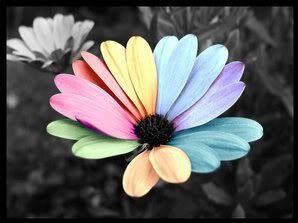
Beautiful effect Upon Image Hover: Now you Can Create them Also !
I know that many of you visit a lot of beautifully designed web-sites and wonder : "Now how did they do that ? " . Well, to be honest : it requires a great deal of work , effort and an unlimited source of knowledge to achieve most of the effects you see on certain websites . These web Designers have spent a great deal of time sitting behind a desk , and they have also devoted a great amount of time reading codes !. No , I hate to break the news to you , but : Nothing comes easy & without a price : Time & Dedication to learning something you actually love .
Now I realize that your intention is not set on becoming another Computer Wiz Kid Genius as the likes of Bill Gates or " Mr. Apple " himself Steve Jobs [ Exec. C. E. O , Sun Systems & borderline Genius ] - therefore I will not torture you with detailed source codes and the like . I realize that most of you just want a nice looking page , with a few Tweaks ( per say ) ; and before I get to the meat & potatoes of this next little handy code here , I would like to inform any one of you passing through this page [ blog site ] , that if you require deeper & more complex codes , help with tweaking , or just a simple Template , please do yourself a big favor and go directly to the Source Code & Design Guru who offers all of his services FREE , and will respond to all and any questions you may have regarding complex codes , tweaks and anything Web Related to suit your needs . he will respond to your inquiry or problem immediately ( believe it or not ) . Visit his site & you will asses for yourself that I am not over-exaggerating . His name is Zen , he is 18 yrs Old and one of the best designers of his age group , and also the sweetest young man you will have the priviledge of meeting . His site is also on Blogger , so please once you get there , don't forget to bookmark his site for future reference & if you'd like , you can join - after all : there's no Fee and it's Free ! . Now how many things in this life are free ? hhhhmmmm..not many , since I checked lately . So, here you go - once you finish reading this , head on over to Zen and browse everything he's got to offer all you Bloggers out there in cyberspace .
Now , lets get down to the meat and potatoes of our present situation . So, you've seen some sites with some really nice effects , such as : when you hover [ pass your mouse ] over a link or an image they light up or change a different color and you want to achive the same effect but you dont know how right ? Ok, this is going to be so simple - much simpler than doing your income tax , I assure you !
Why will it be so easy ? Because : I will not make you sit behind a desk for a couple of years , nor make you read codes ! Now isnt that nice ? All you will have to do is look at the example below , hover [ pass your mouse ] over it , and once you stop marveling at it , you can just copy the code I will place here , insert your own images ( plural ) and just paste into wherever you want the image to appear [ such as an HTML Add a Gadget in your Page Elements section ] or directly into your Page Source HTML , ( if you really know what you're doing ! ). Ok, now that we have gotten the logistics out of the way let's move on .
Look at the image example below , and hover over it to see what an image Hover is :<img src="http://img145.imageshack.us/img145/4613/79181073.png"/>
Our Secondary Image must be a color image , and that can also be any other image color you wish to effect:
Now for the instructions of how to apply which image & where , and then you can just copy the code and replace the images above with your own :<a href="http://YOUR_URL_HERE.com" onmouseover="nameyourimage.src=
'http://img145.
imageshack.us/img145/4613/79181073.png '" onmouseout="nameyourimage.src='
http://img261.
imageshack.us/img261/2292/27094269.png'"
><br /><img src=
"http://img261.imageshack.us/img261/2292/27094269.png" name="nameyourimage" border="0" /></a>Do you see the different colors & the images that apply to them ? This means that you will repeat the " Blue Image Code " twice , and the " Pink Image Code " once , then all which is left is the " Orange Image Code " if you wish to apply a link to your image . Therefore , take an image of your choice , any image . One image , the Pink Code , must be a B& W image . The secondary image in Blue , must be a color image , and this will be the image which will be displayed upon link hover . You can find images as well as an image editor to achieve the color stripping of images @ such places as , Photobucket as well as a more advanced Online Image Editor such as Blibs . Once you have prepared the image of your choice , just copy the resulting URL 's and paste into the appropriate provided colored codes here. Copy and save the above code to your Notepad in your email for future reference until you know it well & have no use of it any longer . I will not bother to give you the CSS version of this code , we shall save that for next round . Now , go get your image and the code & apply some nice effects to your images . Have fun & smile - this could have been a JQuery code - and you wouldnt want that now would you ? Smile , Mootools & JQuery do love you ..really they do ! :)


 Hello and Welcome to MiaZoe.com , I have recently ( about 1 month ago) begun this site as an Art and Design blog where resources will be offered on CSS , HTML, XHTML , JavaScript Source , feature profiles on ' New Up and Coming Web Designers ' and anything and everything pertaining to Development , Web Design , the Arts , Creativity and the like . Hope you will enjoy passing through and will love to hear from you on occasion , if you have ideas suggestions and information you would like to submit please feel free to do so . If you're a Rocker , you can check out my


